Customising Job Services
Acclyptic comes pre-packaged with a range of job services Acclyptic's quotation system provides a streamlined way of generating and sending quotes to your clients directly from your mobile via Email or SMS.
Instant Quoting
Acclyptic's quoting system is designed to be tailored to how you run your business whilst minimising manual input on each job.
Creating quotes is as simple as heading into the roster, creating a job and selecting "Quote" from your services. The job price and duration will automatically calculate as you select each available service.
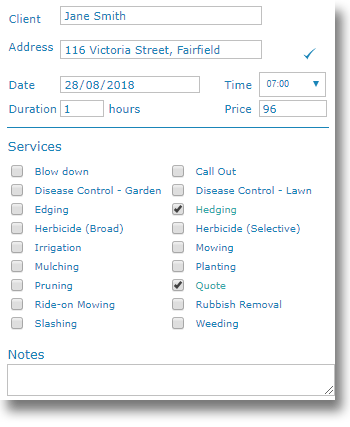
You can manually set the price by typing directly into the "Price" field.

Quote are colour coded out-of-the-box making them easily identifiable in the roster. Quotation, Job and other colours can also be configured to your company branding .
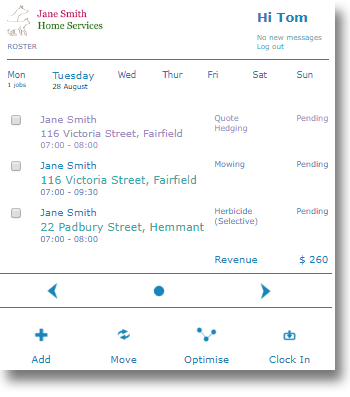
Quotation details
Various details such as the price, duration, time and status are automatically set by Acclyptic. You can change them at a 'generic' level or fine-tune your quote by bringing up the quotation details.
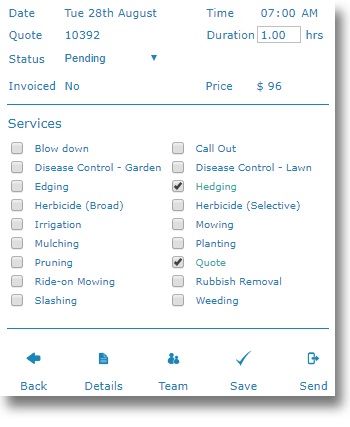
Hit "Details" to fine tune details of the quote, such as sections, materials used and item quantities.
Managing Quotes

Dashboard
Acclyptic provides a clear and easy to read dashboard that lets you see how your business is performing.
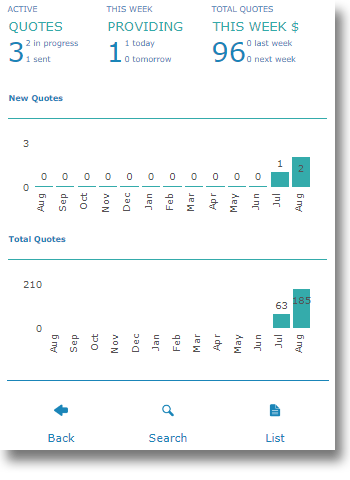
The dashboard will give you an overview of your quote performance, allow you to search through your quotes and provide a full list of quotations in the system.
Direct to your client

Sending your quote
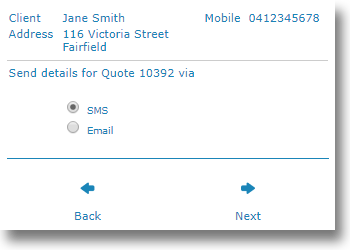
Sending a quote is as easy as opening a Quotation and hitting "Send".
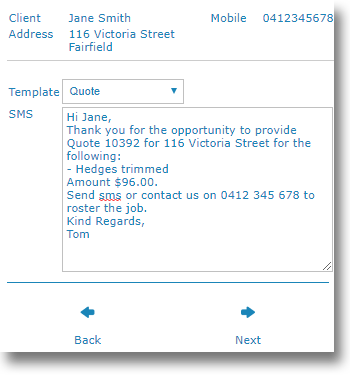
The quotation message will automatically generate based on your Communication Templates.
For more details about setting up and using Acclyptic to help your business, Get Started with Acclyptic and head over to the Support Centre where you will find quick read manuals, news, access to our support staff and more.




Get Started With Acclyptic Care
We'll need some basic information about you to get the ball rolling.
Where are you
We have carers in every state and work with other top tier providers to ensure you have local access to the best quality care available.
How can we help
From property up-keep and social events through to therapeutic services and medical management, tell us how we can help you enjoy every day.